

 ChatGPT
 Claude
 Perplexity
 Grok
Instead of working through a menu of five options, callers using conversational IVR can simply speak. They might say, “Why is my bill higher this month?” The call is directed correctly according to the system’s understanding of your request. As compared to a menu based IVR, queries can be resolved quickly.
IVR is used on a large share of calls. As per McKinsey, it deals with around double the number of interactions than the live agent. However, in seven out of ten firms, 30 percent of fewer calls are resolved through the IVR system itself; therefore, many firms route the majority of their calls to the live agent. In the below section, we discuss conversational IVR, its advantages, considerations while selecting it and the challenges associated with it.
Table of Contents
What Is Conversational IVR?
Conversational IVR allows users to communicate with the system through natural language. It is also called natural language IVR.
Traditional IVR requires callers to choose from set menu options. In case the problem is not mentioned on the list, then they are required to select the one that comes closest to their need. As a result, confusion may arise as they can be connected to the wrong department and would be required to repeat themselves.
How Does Conversational IVR Work?
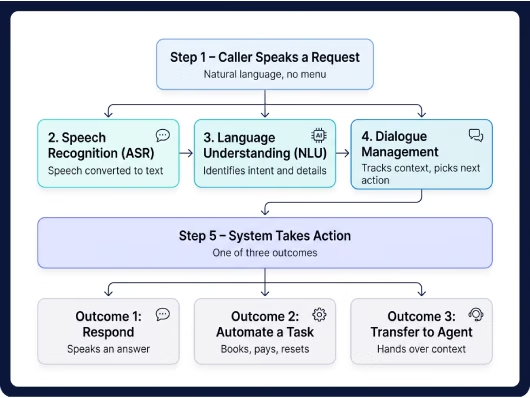
Behind a natural-sounding conversation is a sequence of technologies working together in a matter of seconds.
- The caller speaks a request.
Once you respond to the question, for example: I need to change my appointment, the conversation will begin. There is no learning of what to say in menus, or repeating set responses. - Automatic Speech Recognition (ASR) transforms voice into text.
The ASR system listens to the voice and transcribes it into textual form. Contemporary ASR is capable of processing various accent, speed, noise, and line quality variations, and it is important since call recordings usually are anything but flawless.
- Natural Language Understanding (NLU) identifies intent.
Natural Language Understanding (NLU) identifies the intention and extracts information (entities) in a user’s speech. This information may be dates, account numbers or product names. For example, “I need to reschedule my appointment for Friday” will be interpreted as an intention of reschedule appointment and extract the entity of ‘Friday’. NLU will also understand that different phrases for the same task, like ‘move my booking’, ‘change my appointment time’, all have the same intention. - The dialogue management process considers context and determines the next action to take.
Dialogue management contains logic to decide what should happen next based on the context of the conversation. It understands the conversation so far, what information it is missing and decides what to do next. This can be by asking a new question (“Which day would suit you best?”), checking who the customer is, or retrieving information from back-end systems. Due to understanding the context of the conversation, customers can respond naturally, change their mind during the call and answer questions out of order.
- The system either performs a task automatically or passes the call on to an agent.
Finally, a task can be performed by the system. Alternatively, the call can be routed to an agent.
- Respond with an answer, spoken back using text-to-speech (for example, an account balance or store hours).
- Complete an automated task, such as booking an appointment, processing a payment, or resetting a password through integrations with CRM or business systems.
- Transfer to a live agent when the issue is complex, the caller asks for a person, or the system isn’t confident it understood. Effective set-up conveys the conversation details without making the caller repeat themselves
Conversational IVR, Traditional IVR and AI Voice Agents
Here is how the three compare:
|
|
Traditional IVR
|
Conversational IVR
|
AI voice agent
|
|---|---|---|---|
|
Customer interaction
|
Presses keys or says set words from a menu
|
Speaks in everyday sentences on defined topics
|
Holds a free-flowing, back-and-forth call
|
|
Speech and intent recognition
|
Key presses, or a few fixed spoken words
|
Recognises speech and works out the caller's intent
|
Recognises intent and handles changes of topic in longer calls
|
|
Automation capabilities
|
Routes calls and plays recorded information
|
Completes common requests such as order status or booking, routes the rest
|
Can handle wider tasks from start to finish, depending on setup
|
|
Context awareness
|
Little. Every caller hears the same menu
|
Remembers what was said during the call and can use account details if connected
|
Remembers the whole conversation and uses connected data
|
|
Live-agent handoff
|
Transfers to a queue, often without details
|
Transfers with the reason for the call and details collected
|
Transfers when asked or when it cannot help, with a summary
|
Key Benefits of Conversational IVR
- Easier for callers. There is no need to go through a menu. Everyone uses assistants like Siri and Alexa on an everyday basis, and according to McKinsey, voice assistants have gained widespread acceptance.
- Faster resolution. McKinsey found that customers want their queries resolved as quickly as possible. Simple requests can be handled more quickly because callers do not need to deal with a menu.
- 24/7 support. Routine queries can be resolved outside working hours, on public holidays and during busy periods. Urgent queries can wait until someone is available.
- Less work for agents. Queries that can be resolved automatically never reach an agent, so agents only receive those that need judgement.
- Better routing. The call is routed based on what the caller says, so it is less likely to go to the wrong place.
- Improved satisfaction. McKinsey has found that next generation IVRs have produced a five-fold increase in satisfaction ratings along with a drop in the number of calls to agents of more than 10%. Performance is based on how the system is set up, but the results demonstrate the capability of conversational IVRs.
Common Business Use Cases of Conversational IVR
- Banking. The verification process is completed, the customer will be able to inquire into account balance or any transaction history or status of the card. When there is a suspicion of a lost card or fraud, the call is transferred to a live agent.See Bonvoice’s banking solutions.
- E-commerce. Order status inquiries or returns can be managed. The process involves providing tracking details and initiating the return process, but not for damaged goods and refund. See Bonvoice’s retail solutions.
- Healthcare. Appointment booking, modification and scheduling, reminders and reporting times. Urgent queries should be passed quickly to a person. See Bonvoice’s healthcare solutions.
- Telecoms. Bill questions, plan details, top-up help and service requests. “Why is my bill higher this month?” is a common one.
- Travel and hospitality. Checking booking status, changing dates, check-in times and cancellation policies. A guest can move their stay by two days without navigating menus.
How to Choose the Right Conversational IVR Software
Try the software out with your own calls, and consider the following:
- Supported languages. Which languages and accents does it support? If your callers speak a mixture of English, Hindi, Malayalam and Tamil, test it with real recordings.
- CRM and business application integration. To get the most from the system, it should integrate well with your CRM, orders and bookings. Check how well it does.
- Workflow automation. Can your internal team customise workflows easily, or do you have to wait for the vendor? Slow updates are a common problem with IVR, as McKinsey points out.
- Routing to an agent and context. When a call is passed to an agent, do they know what the caller said and what information has been gathered?
- Security, scalability and reliability. Calls involve personal information and payments. Understand how data is secured and where it is stored, and check that the system can handle your busiest days.
- Costs. Conversational IVR is typically more expensive to implement and train than traditional IVR (TechRepublic). Look at set-up costs, costs per use and the cost of individual changes. Bonvoice’s pricing plans are on its pricing page.
How to Implement Conversational IVR Successfully
A good rollout starts small, focuses on the calls that matter most, and improves over time based on real call data.
- Determine recurring questions
Look at recordings, transcripts, and tickets to identify recurring questions. The type of question which occur frequently with little complexity (i.e. checking order status, account balance, rescheduling an appointment, resetting a password and finding opening times) are ideal to be automated. This means customers will get quick support without having to speak to a human.
- Define automation goals, and create flows
Before creating your automation, you should decide what you want to achieve. Reduce calls by 40% or cut call durations in half. Design flows using the use case as a guide. Decide on a welcoming statement for the flow, what information is to be gathered from the user, what variations will occur and what outcome it has. Each message should be short, clear and allow for different ways of asking the same questions
- Connect with back-end systems
Linking to backend systems (CRM, Billing, Booking, Order) allows the chatbot to be personalised for each caller. It knows who the person is and can perform actions such as refunds and booking slots. If linked to backend systems, the customer can be greeted by their name, and reminded of previous orders.
- Escalating to agents and fallback
Decide on when to escalate to agents. This could be because the user requested to speak to a person, there was a low confidence in the response, it contained sensitive information, or there were 2 unidentifiable users. Fallback responses should be put in place so that alternative options can be given to the user. If it is escalated to an agent, ensure that information about the conversation and the user is sent over. This means that the information does not need to be repeated.
- Monitoring and improving
After building the model, test with real users, including different accents, noises and unnatural speech. After deployment, regularly check the transcripts, and any failed interactions. Identify any issues with intent detection or dead ends within the service. Confusing prompts may also be identified. Improve by retraining and tweaking. Continuously improve to get the best service.
Once your model has been created, test it with real users. Try using users with different accents, interference and unnatural speech. Once deployed, regularly check the transcripts and failed interactions. Problems with the intent detection, or dead-ends in the service may be found. Or confusing prompts may be given. Try improving by retraining, and making small tweaks. Continuously improving will give the best service.
Key metrics to track
|
Metric
|
What it measures
|
What to look for
|
|---|---|---|
|
First Call Resolution (FCR)
|
Percentage of issues resolved on the first call, without a repeat contact
|
A rising FCR suggests the IVR is actually solving problems, not just deflecting callers
|
|
Call containment rate
|
Percentage of calls fully handled by the IVR without reaching an agent
|
Higher is better, but only if FCR and CSAT hold steady, since forced containment frustrates callers
|
|
Average Handle Time (AHT)
|
Average duration of a call, including any agent follow-up
|
Falling AHT for agent-handled calls shows the IVR is collecting information and routing correctly up front
|
|
Customer Satisfaction (CSAT)
|
Caller ratings, usually from a post-call survey
|
The most important check on whether automation is helping or hurting the experience
|
Challenges and Limitations of Conversational IVR
Conversational IVR can greatly improve self-service, but it has real limitations that are worth planning for.
Speech recognition errors and background noise
Even though speech recognition is accurate in conversational IVR, if customers call from noisy environments (such as a car, or in a very busy area) or if they have poor mobile signal quality, speech recognition errors could occur. If key pieces of information such as account name/number are incorrectly picked up, this could cause issues in the conversation. By confirming critical pieces of information (Did you say 4-7-2-1?) and Can be minimised by using key pads.
Accents and language variations
Differences in accents, regional variations, speaking speeds and vocabulary can occur between users. Users may also change the language they are speaking in throughout a call. This can cause issues with systems which were primarily trained using one type of speech. Testing with a large range of people, and fine tuning the system to suit specific users in your client base can help to reduce this issue. Including multiple languages can also help.
Complex customer requests
Complex, emotional or judgy queries will be difficult. If users struggle to describe complex situations in a single call, it may become confusing to the user. In these cases it is best to direct the user to an agent as quickly as possible
Integration and response latency
If there are delays in retrieving information from the CRM or back-end system, this can become frustrating for users. Users may hang up or speak over the call. If systems are poorly integrated, responses may be incomplete or incorrect. Smooth integrations, caching of frequently accessed information and placeholder messages (such as “One moment while I check that”) improve the user experience.
Need for reliable human-agent escalation
There must be a reliable option to connect to an agent. If users cannot get in touch with an agent quickly, or if the agent does not have the required context once transferred, the usability and reliability of the service will drop quickly. However, if there is an easily available exit point and all information the user has provided is transferred, the automation will provide a useful service.
Is Conversational IVR Suitable for Your Business?
Conversational IVR suits businesses with many similar queries, many menu options, or customers who are unsure which option to choose. In hospitals, for example, people may not know what to select. If you receive few calls with little variety, a short keypad menu may be enough, and conversational IVR may be overkill. Emergency calls and high-stakes claims are usually better served by a person.
Bonvoice provides cloud telephony and business communications in India. We offer IVR, AI Voice Agents, a Voice API for building tailored solutions, and CRM integration. If you’re unsure whether a simple menu, conversational IVR or a more advanced solution suits your calls, our team can help you work out which queries you receive. Book a demo to get started.
FAQ
What is the difference between conversational IVR and traditional IVR?
Standard IVRs ask users to navigate using keys or pre-recorded phrases. Conversational IVRs ask users to talk naturally to give the information they want.
How does conversational IVR understand customer requests?
Speech is converted to text. Intent recognition and information extraction enable a system to know what to do next.
What is conversational IVR?
It is not the same thing as conversational AI. Conversational AI refers to chatbots and voice assistants. Conversational IVR is conversational AI applied specifically to calls.
Can conversational IVR integrate with CRM software?
Typically, yes. Integrating with a CRM lets order and account information be pulled in and relevant details passed to agents. Check with your provider which systems it can integrate with.
Does conversational IVR support multiple languages?
It depends on the provider. Check which languages and accents are supported. If your callers speak a mixture of languages, test with real calls.
Can conversational IVR replace human agents?
No. It reduces the number of simple queries agents have to handle, but complex, sensitive and high-stakes queries should still be dealt with by a person.
What is the difference between conversational IVR and AI voice agents?
Conversational IVR focuses on understanding queries, then routing them or completing simple tasks. AI voice agents are designed for broader, open-ended conversations. Compare the two on Bonvoice’s AI Voice Agent page.