 ChatGPT
 Claude
 Perplexity
 Grok
Multilingual IVR is an interactive voice response system which allows your customers to choose the language they wish to speak in (Hindi, English, Tamil etc) and everything they hear (menu options, prompts and divert) will be played in that language. They can simply press the correct key (or speak) to select the language.
This is a great option ivr for businesses in India as customers will not all press ‘1’ to choose English if they are from Lucknow, Chennai or Kochi. In this guide we will show you how Multilingual IVR works, which languages to include, how to Set It Up and what the rules are in India.
What is a Multilingual IVR?
Interactive Voice Response (IVR) systems automatically answer calls and guide the caller through a menu. A multilingual IVR is an IVR service that allows the caller to choose their language. All menus, prompts and call routing will occur in the language they have selected. There will be no language barriers between customer and agent.
How does a multilingual IVR work?
Interactive voice response (IVR) systems automatically answer calls and guide people through a menu. The caller is greeted and asked to pick a language. This is stored throughout the call and any subsequent menus are played in that language. The caller is then routed to the correct queue or agent group. The same principle can also be used to send an SMS or WhatsApp message in the same language.
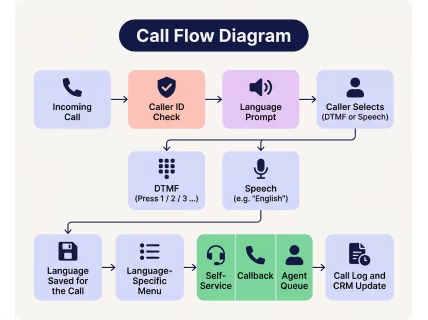
An example of how a typical call would work is;
1. Call received
The caller will call you on your IVR number (or toll free, local or virtual). The system will identify the caller from their caller ID to see if they have been here before.
2. Language prompt
The system will ask the caller to choose their language. If there is an existing preference for that number in your CRM this can be skipped.
3. Language selection
The caller will select their language by pressing a key, or speaking the name of the language. The system will convert the speech into text and match it to a language.
4. Language set
This will then be applied to the call. All prompts (whether pre-recorded or text to speech) will be in this language.
5. Call routing
Depending on the language and menu selection the caller will be put into a skills based queue, callback or self service flow.
Why would Indian businesses want this?
India is a country with many languages. Most individuals would want to use their language. There are 22 scheduled languages within the Eighth Schedule of the Constitution. Whilst Hindi is the most common mother tongue, it isn’t the majority. So no matter what language you choose, there will be some callers who won’t understand.
Some key factors to note:
- There are 22 languages listed in the Eighth Schedule. However, there are many more mother tongues listed in the Census of India. These are split into Scheduled and Non-Scheduled languages.
- Hindi is the most common language. In the 2011 Census, Hindi was the most common mother tongue with around 44% of the population. This means over half the country don’t use Hindi as their first language. For a great overview of languages in India.
- There are a lot of phone users. According to TRAI, there are over a billion wireless connections. Phones are still the go to for support, collection and sales.
- The last full data on Languages within India was collected in the 2011 Census of India . We will have a new insight into this when we get the next set of data. It is important to note that whilst there may be a preference, this does not mean that they are their mother tongues. Many will speak a second or third language.
From a business perspective callers will understand the menu, undertake more actions, are less likely to drop off and therefore connect to the correct agent. Language barriers can often cause repeat calls within many IVR service providers.
How can callers select their language?
You will want to offer key press, speech, automatically detected by caller ID / CRM, individual numbers for each language or a callback / WhatsApp link. Regardless, you will want to let your callers know what languages are available in their language. The bonvoice will detect the language and change accordingly. There is no need to choose or press any keys.
|
Method
|
How its Works
|
Best For
|
Out Come
|
|---|---|---|---|
|
Keypad (DTMF)
|
Caller presses 1, 2, 3 for each language
|
Most businesses, noisy lines, feature phones
|
Lists longer than 4 or 5 options frustrate people
|
|
Speech
|
Caller says "Hindi" or "Tamil"
|
Smartphone users, advanced setups
|
Accents, background noise, Hinglish
|
|
Caller ID or CRM lookup
|
System spots a returning caller and plays their saved language
|
Repeat customers, collections, support
|
Shared phones, outdated records
|
|
Separate numbers per language
|
Each language has its own number
|
Regional campaigns and ads
|
More numbers to manage and track
|
|
Callback or message link
|
Caller picks a language by SMS or WhatsApp, then gets a call
|
Outbound and missed-call flows
|
Needs solid data and consent setup
|
Which languages should you offer first?
Make sure that you’re offering languages your callers are actually using. Look at your state data within your CRM, plus your lead sources and call logs. Rank them based on the highest number of calls and revenue. Start with 2-4 languages. You can always add more languages later.
|
Languages
|
What to expect
|
|---|---|
|
Hindi, Indian English, Hinglish
|
Strong for most support calls; still verify names and numbers
|
|
Tamil, Telugu, Kannada, Malayalam, Marathi, Bengali, Gujarati
|
Good for common intents; test accents by region
|
|
Punjabi, Odia, Assamese, Urdu and regional dialects
|
Pilot first; keep a human fallback ready
|
What does it take on a real phone line?
Testing using real phone numbers
- 8 kHz audio: Phone networks use narrowband audio, which is much poorer than the clean microphone audio most models are trained on. Check with your provider to see what tests they performed with real-quality voice samples.
- Background noise: Markets, traffic, TV in the background, a pressure cooker whistle. Test with all of it.
- Latency: If the agent takes more than about a second to respond, callers start talking over it or assume the line dropped. Quick responses. If you need time to look something up, add short delays with phrases such as Ek second, check karta hoon.
- Interruptions: Indian callers interrupt. A lot. Aim for quick, steady replies, and use short filler phrases (“Ek second, check karta hoon”) while it looks something up.
- Indian numbers: Callers trust a familiar number. Make sure that these entities can be connected to either Indian freefone/local/virtual numbers. More information about connecting to smart IVR service can be found in the API summary here.
When should it hand off to a human, language by language?
Not an issue for top quality AI voice assistants. Be very clear on what conditions need to be met for a transfer and ensure that a real agent is available in the correct language.
|
Trigger
|
What the agent does
|
|---|---|
|
Caller asks for a person
|
Transfers right away, no questions asked
|
|
Two failed attempts to understand
|
Apologises, then hands over
|
|
Angry or distressed tone
|
Escalates; see how AI sentiment analysis detects this
|
|
Sensitive topics (payment disputes, legal threats, medical issues)
|
Transfers with a summary
|
|
Language not supported
|
Offers a callback or routes to the nearest available language
|
Set up different queues for each language to avoid people having to wait in a queue when they speak a different language. Be honest about your hours of availability. If you don’t have any Marathi agents online at 10pm then give them the option to be called back at a scheduled time. Give the human the transcript + summary to avoid customers having to repeat themselves. Using smart routing makes this very easy. We have an article explaining how automatic call distribution works.
What support calls can it handle?
Our AI voice assistant can handle the most frequently requested customer support calls completely, in their own language, with no waiting in queues. All intents below can be used in all languages (English, Hindi, Tamil, Telugu, Malayalam etc).
Order status
Customers can ask about the status of their order, find out when it will be delivered and track it in one go. We can keep them updated on any delays and offer to provide tracking links via SMS/WhatsApp.
EMI due date
Customers can find out when their next EMI is, how much they should pay and what they owe. We can remind them to pay and provide a payment link so they don’t miss any payments and incur late fees.
Appointment
Customers can book, amend or cancel appointments. We can check availability in real time and confirm the appointment. A confirmation message is sent.
Complaint registration
Customers can raise complaints and provide information about the issue. This information will be captured by the assistant creating a ticket. The reference number will be provided to the customer and escalated to the correct team. Cases that are urgent or sensitive will be escalated to a live agent with all contextual information.
Language supports
The assistant will automatically detect the language your customer is using or allow your customer to select the language they wish to speak in. The level of service will be consistent in all languages and there will be no need to change to English.
What do Indian rules mean for AI voice calls?
AI Voice Assistant Rules for India
Notice displayed in customer language: The Privacy Notice required to be displayed behind the consent request under the DPDP Act must be offered in English or any of the 22 languages listed in the Eighth Schedule to the Constitution. It would therefore be best practice to provide this notice in the language your customer is already speaking. However, full notices and requirements around consent have been implemented progressively over 18 months since the notification of November 2025 and will end on May 12th 2027. It would therefore be best practice to include this within your solution prior to launch. (taxguruazbpartners)
Recorded Notice: Let people know you are recording the call and what it’s for. This is classed as personal information as it is a voice recording, so this links back to DPDP. There isn’t any rule in place for this, but it is best practice and effectively required by DPDP.
Number Series for Outbound Calls:
TRAI keep service and promotion calls on separate numbers.
- 1600 series: for service and transactional voice calls only. It is used by banking, financial and insurance entities and by government, so EMI reminders from a lender belong here. nseindia
- 1601 series: covers service and transactional calls from utilities, courier and logistics companies, so order-status calls from those sectors belong here. moneylife
- 140 series: for promotional calls only. All entities must be registered with their telecom provider under the TCCCPR. Calls will be verified against the customers DND preferences.
Key press IVR, Voice IVR or AI Voice Agent?
A key press IVR will use numbers. A Voice ivr service provider will understand speech commands in a limited range of answers. An AI Voice Agent will use voice recognition and language models to allow free flowing conversations. Choose depending on how complex your calls are. Key presses are great for routing. Voice is great for a simple menu. AI are great for complex queries.
Most businesses in India should begin with a key press interactive voice response. Only include voice or AI voice agent if there is a genuine need shown from data.
When should you move to an AI voice agent?
For scenarios where you have frequent free-text responses needed, too many layers of menus causing drop out or needing to qualify conversation with reminders or support at scale. Use a simple keypad IVR service to route and bring in AI where your data can clearly show you need it.
Look out for:
- High press-zero or transfer rates despite a good menu
- Lots of calls about similar questions that need varied answers
- Callers who mix languages, such as Hinglish
- Lead qualification or appointment calls at high volume
Read more in our guide to AI voice agents.
How do you choose a provider?
How do you choose a provider?
Ask them to answer these 10 questions as part of your comparison. Ensure they can give you a written answer and provide evidence from a pilot conversation.
1. What languages can it understand and what accuracy can it achieve?
Ensure they can provide accuracy for each language, including when callers switch between languages, have background noise or interrupt.
2. How does the text to speech work in each language?
Ensure they provide samples for each language you require, and ask native speakers to listen. Ensure the voice sounds natural to the region and brand/product names are pronounced correctly.
3. Where will our data be stored?
Where will audio, transcripts and logs be held, for how long will they be stored, who will have access, how will they be removed and will our calls be used to train their models? If you are in banking or insurance you will need to check if your regulator has specific requirements around data storage.
4. How will it manage consent and calling guidelines?
It should play a message to let them know they will be recorded and offer a language-specific privacy notice. For outbound calling it should support the correct number series (1600/1601 for service calls, 140 for marketing) and registration.
5. How will it allow a transfer to a human?
It should allow details to be transferred to a human agent including a summary of the conversation, so they don’t have to ask the customer to repeat themselves. What will cause a transfer (anger, multiple misunderstandings, asking to speak to an agent) and what will happen out of hours?
6. Does it connect with our CRM? It should be able to read customer/order/loan information whilst on the call, and create tickets/notes/appointments after. Will this be an out-of-the-box integration or bespoke?
7. Want a second. Does it connect to our CRM in both directions?
Can customer/order/loan data be pulled in live? Can tickets/notes/appointments be created post call? Is this an out-of-the-box solution, or bespoke?
8. How does WhatsApp work alongside the call? .
Can payment links and confirmations be made during/after calls? Are message templates approved? Can the conversation be continued on WhatsApp?
9. Will it pass our own test?
Run a pilot with native speakers. Define passing criteria in advance. If calls do not pass, what will be done by the provider to improve?
10. What does it really cost?
What is the cost per minute? How does the pricing change for long calls, unsuccessful calls, additional languages and transfers? How quickly will support be provided? Who will fix issues once it goes live?
You should be able to clearly answer all 10 questions. If a provider is unclear about how many, where or how these calls are routed then this may be a red flag. We can provide this checklist as a single page document to make it easy for scoring each provider.
How Bonvoice can help
We provide a multi-lingual, cloud-hosted IVR service. This includes call recording, analytics, CRM & WhatsApp integration, freephone and virtual numbers. We allow simple keypad navigation for basic IVR service. From here, businesses can easily add voice and AI.
Check out our IVR page to see what features we can offer. Or, check out our IVR pricing. Alternatively, get in contact with our team to create a custom IVR for your business callers. Do follow us on LinkedIn for updates.
FAQs
What is a multilingual IVR?
Yes. The IVR service provider can be programmed to allow callers to select the language they want to speak in (Hindi, English, Tamil etc.) and will play out menus and prompts in that language. It supports keypad and speech inputs, and routes individuals to agents speaking that language. This means you are able to help customers in the language they understand best.
How many languages can an IVR service support?
Theoretically, a cloud based IVR service can support a large amount of languages. However, availability of recorded prompts, speech recognition or text-to-speech and availability of staff mean there may be limitations. We recommend starting with a small amount (2-4) of languages and increasing the number as you see demand from call data. Only include languages where you have staff available to support, or callback support.
Can an IVR service switch language mid-call?
Yes. By including an option to return to the language selection screen on key press (for example 9), the system will play that menu in the selected language. If returning customers are calling, the preferred language can be saved into your CRM.
Can it understand Hinglish?
Keypads do not require this. Speech based IVRs and AI voice agents can support Hinglish if it has been trained. Support may vary between providers. You should try this out with actual customer recordings to be sure.
Is a multilingual IVR the same as an AI voice agent?
No. Multi-language IVR service give menu-based responses in multiple languages, whereas AI voice agents can have free flowing conversations using speech recognition and NLP. Often businesses will use an IVR to route customers, but an AI voice agent will be used for more complex or conversational calls.
Do I need separate numbers per language?
Probably not. Most businesses will just have one number, with customers choosing their language of choice. However, using different phone numbers can be useful if you are running region-specific advertising or wish to see how much demand you get in each language from different sources. It increases the number of phone numbers and call routing rules that you need to manage however, so begin with just having one number.
How long does setup take?
A basic keypad IVR service with limited languages can be set up within days of having prompts and numbers prepared. Adding approved numbers, bespoke integrations, speech or AI functions, and multilingual prompts will increase the time taken. You should allow additional time to have native speakers test the system in all languages
Is call recording consent needed?
If possible, you should inform callers that calls may be recorded and why in the language selected by the caller. Depending on sector and usage, and the relevant data legislation (such as DPDP Act), there may be requirements. This is not legal advice. Please consult a qualified legal professional to determine what is required.