
 ChatGPT
 Claude
 Perplexity
 Grok
Grok
Introduction
With a large customer base & high message open rates, businesses choose WhatsApp as their preferred channel for customer-business interactions. Sales teams, support, marketing, and authentication workflows use WhatsApp Business API. WhatsApp API solutions successfully deliver order updates, reminders, OTPs, and marketing campaigns. When considering the basic WhatsApp business app, the WhatsApp business API is designed for medium and large companies that need access to multiple agents, integration with CRM, chatbot support, and verified brand communication. It runs on the WhatsApp business platform of Meta. It also requires approval and structured setup.
In this complete guide for WhatsApp Business API, we will learn how to set up WhatsApp business API, pricing models, integration options, cloud vs on-premise setup, use cases, advantages, disadvantages, and how to choose the best WhatsApp API provider in India and globally.
What is WhatsApp Business API?
WhatsApp Business API/ WhatsApp Business Platform is a technical bridge between WhatsApp and a company’s internal software like a CRM. It is mainly for medium and large sized companies. It is different from the WhatsApp business app as it is designed for companies with thousands of customers. Since there is no “app” for the API, we can’t just download it. To use it, a business typically connects it to a Business Solution Provider (BSP) or a platform like Bonvoice.
WhatsApp Business API is built for automation, multi-user access, CRM sync, chatbot deployment, and verified business messaging. In order to use the official WhatsApp API, businesses must complete Meta business verification, phone number verification, and template approvals. It is commonly used by ecommerce brands, fintech firms, logistics providers, healthcare institutions, education platforms, and enterprises that need omnichannel communication and cloud telephony alignment.
WhatsApp Business App vs WhatsApp Business API
The WhatsApp business app works well with small businesses. But for businesses that need automation, integration with internal software, or campaign broadcasting, the WhatsApp business API India and global deployment is the correct choice. Let’s look into some of the features that differentiate between WhatsApp business app and WhatsApp business API.
|
Feature
|
WhatsApp Business App
|
WhatsApp Business API
|
|---|---|---|
|
Best for
|
Small business
|
Medium/Large business
|
|
Multi-agent access
|
Not supported
|
Fully supported
|
|
Device needed
|
Mobile app
|
Cloud hosted/server
|
|
Automation
|
Limited
|
Advanced
|
|
Chatbots
|
Available
|
Not available
|
|
CRM integration
|
Not available
|
Complete CRM integration
|
|
Broadcast scale
|
Limited
|
Large scale
|
|
API access
|
||
|
Template message
|
No
|
For outbound messaging
|
|
Supported
|
How does WhatsApp Business API work?
We can think of the WhatsApp business API as a high speed data pipe. Meta, who owns WhatsApp stands on one end and a company’s computer system is on the other end. Let’s see how it works:
- Meta business manager (The Gatekeeper): Before a business can send the message, Meta should know that the company is real and genuine. It is like a background check. After the Meta verifies the business, they will unlock the data pipes for the company. So, the company can now start communicating with their customers.
- Phone number verification (The identity): A specific number is needed for setting up WhatsApp business API. Businesses can’t use a number that is already in use. The API will claim the number. After the verification, the number is no longer with a single smartphone. It will live on a server. This will allow businesses to handle thousands of chats at once.
- Message templates (The rules): For Meta to allow a business to send messages to its customers, the business should use a pre-approved script from Meta. This is to prevent businesses from spamming people. Meta will check these scripts and make sure it is not annoying or spam.
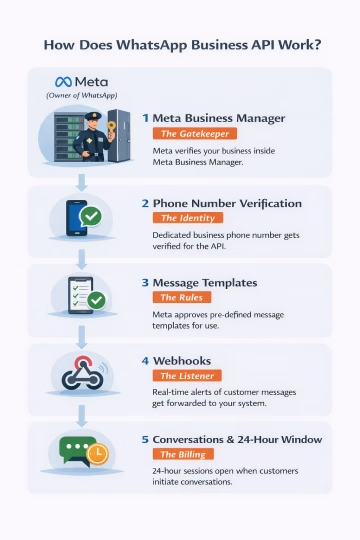
- Webhooks (The ear): We can think of webhooks as a listener. When a customer sends a message to a business, the webhook will hear it. Then, immediately push that data to the business’s software. The internal team will now see it. It’s like a ping that tells the business system that an event happened. The delivery status, read receipts, replies, and conversation triggers are captured automatically for automation workflows.
- Conversations & 24-hour window (The billing): WhatsApp Business API doesn’t charge per message. It charges for an entire chat. When a customer asks a question, the timer will start. For the next 24 hours, businesses can chat back and forth for free without using those strict templates. Businesses pay once, and can communicate as much as they want for the next 24 hours.
WhatsApp Cloud API vs On-Premise API
For businesses, deciding between WhatsApp cloud API and on-premise API is a major decision during deployment.
- Hosting: WhatsApp cloud API is hosted by Meta. Infrastructure, scaling, and uptime are managed centrally. On the other hand, on-premise WhatsApp API requires a business or its BSP to host servers.
- Control: On-premise offers deeper control on infrastructure and customization. But, cloud API offers managed simplicity with standardized controls.
- Cost: With cloud API, companies can avoid the hosting costs and get a free tier for API calls. On-premise setup will include servers, maintenance, and other costs.
- Scaling: With clouds, the scaling is automatic and elastic. However, on-premise scaling requires manual infrastructure expansion.
- Security: Cloud and on-premise setup offers security. Cloud setup will follow the security frameworks by Meta. On-premise depends on the security methods followed by the company.
For most startups and growing companies, WhatsApp cloud API is faster and cost-effective. Large companies may opt for on-premises setup for compliance control.
WhatsApp Business API pricing explained
WhatsApp business API pricing is based on the conversation and not per-messaging cost.
- Conversation categories: Marketing conversations include promotions and campaigns. Utility conversations include order updates and alerts. Authentication conversations include OTPs and service conversations occur when the customer messages first.
- India vs global rates: WhatsApp business API pricing in India is lower when compared with other western markets. Authentication and utility conversations are the cheapest categories.
- Business solution provider (BSP) charges: A WhatsApp API provider or BSP may charge the onboarding fee, platform fee, automation fee, or per conversation margins.
- Hosting costs: Cloud API reduces the cost of hosting. On-premises needs more infrastructure budget.
- Free tier: Cloud API provides a limited free API call tier monthly. This is useful for sandbox testing and early deployment.
- Messaging limits & quality rating: With higher quality rating, the messaging limits will also increase. Poor engagement lowers allowed broadcast volume.
How to get WhatsApp Business API- A step-by-step method?
To get the WhatsApp Business API, companies should follow the below steps:
- Meta business verification: Initially, the business should register and submit the documents for Meta verification. After the approval, the business will become a legal entity.
- Cloud API/BSP: Now, it is needed to decide between direct WhatsApp cloud API or working with a WhatsApp API provider platform that offers dashboards & automation tools.
- Phone number setup: To set up the phone number, select & verify a dedicated number. The existing WhatsApp accounts must be removed before migration.
- API access & token setup: Then, generate a WhatsApp API token & connect to meta graph API endpoints. This is for secure authentication.
- Template creation & approval: Then, businesses must create message templates for marketing, utility, & authentication. Then, submit it to Meta for approval before using it.
- Integration: Lastly, complete the WhatsApp API integration with CRM, chatbot, website widgets, or cloud telephony platforms. This is possible with the help of webhook integration and API documentation.
The various options in WhatsApp API integration
The various options in WhatsApp Business API integration includes:
CRM integration
The WhatsApp business integration works with CRM platforms. This allows context driven communication. For e.g., Bonvoice cloud telephony integrates WhatsApp workflows directly with Zoho, Bitrix24, & salesforce. This allows message logs, customer history, and automation triggers to sync automatically across records.
- Zoho
Bonvoice-Zoho integration enables the team to access complete customer interaction history within the CRM interface. Every chat, call, inbound query, etc will automatically sync. So, sales and support teams have the information that help them to respond faster, personalize conversations, and close more deals without switching between systems.
- Bitrix24
Bonvoice combined with Bitrix24 allows businesses to unify customer communication across various channels. When a customer calls, Bitrix24 creates a record where the data can be stored. When a customer asks a question, it is assigned to an agent like a task. Agents can also get the information on previous conversations by looking at the profile of the customer.
- Salesforce
Bonvoice and Salesforce pull all the WhatsApp chats and calls directly inside the profile of the customer. Without switching between apps, the sales or support teams can see every history on the contact page. So, agents can send tailored messages with the CRM data and set up the automatic follow-ups. So, the team will stay organized.
- Kylas
Bonvoice partners with Kylas and offers seamless communication and CRM together in one powerful solution. With Bonvoice’s cloud telephony and WhatsApp integration inside Kylas, businesses can manage calls, messages, and customer data from a single dashboard. This collaboration helps sales teams respond faster, track conversations easily, and close more deals efficiently.
Website Integration
With the website integration, companies can add the WhatsApp chat widget on their websites. This allows visitors to start the chat instantly. These chats connect to the WhatsApp API endpoint and flow into agent dashboards or chatbot systems.
Chatbot Integration
WhatsApp chatbot automation can manage frequent questions from customers, qualify leads, booking flows, and support routing. Chatbots use webhook triggers and automation logic to reduce agent workload. This also results in fast responses.
Shopify / WooCommerce Integration
E-commerce platforms can connect WhatsApp for order confirmations, shipping alerts, cart recovery, and promotional campaigns using plugins and API connectors.
Webhook Setup
Webhook integration enables real-time event streaming like message status, replies, and delivery data feed directly into business systems for automation and analytics.
WhatsApp Business API use cases
WhatsApp Business API is very beneficial in the following sectors:
- E-commerce: E-commerce stores can use WhatsApp API for sending order confirmations, tracking, delivery messages, or return updates. Customers use WhatsApp as the messages are read faster and feel more tailored.
- Banks: Banks and other financial services use WhatsApp API for OTP verification because these messages have high delivery reliability and faster user response than SMS.
- Healthcare services: The services can send automated reminders and reschedule links. This will reduce no-shows & improve operational efficiency.
- Sales teams: Chatbot flows qualify leads through interactive questions and route hot prospects to sales agents. This improves conversion rates and reduces manual screening.
- Customer support: Customer service teams automate ticket updates, status alerts, and first-line support responses. Multi-agent inboxes enable scalable support operations.
- Marketing teams: With approved templates, businesses run targeted campaigns and promotional outreach. Proper segmentation and consent maintain quality rating and messaging limits.
Best WhatsApp Business API providers in India
In this section, we’ll see some of the top WhatsApp Business API providers in India and how each provider suits for industries.
|
Provider
|
Best for
|
Pricing
|
Setup speed
|
|---|---|---|---|
|
Bonvoice
|
Cloud telephony + CRM + WhatsApp
|
Flexible
|
Fast setup
|
|
Exotel
|
CPaaS voice+messaging
|
Mid
|
Medium speed
|
|
Twilio
|
Developer first API
|
Usage based
|
Fast setup
|
Bonvoice is positioned strongly for businesses needing cloud telephony plus WhatsApp API integration, CRM sync, IVR, automation, and omnichannel communication in one platform. Exotel is known for its CPaaS voice and messaging infrastructure. And Twilio is widely used by developers for programmable messaging APIs.
Advantages of using WhatsApp Business API
- Automation at scale: Companies can automate workflows, replies, and alerts without the help of an agent. This will reduce the operational load and cost. However, they can maintain instant response ability.
- High engagement: Many customers tend to open WhatsApp messages compared to SMS or email. So, WhatsApp Business API is a good option for time sensitive communication.
- Multi-agent access: With the help of shared inbox systems, several agents can manage conversations.
- CRM sync: With deeply integrating with CRMs, WhatsApp API helps agents to access the context of the customer communication. Agents can see previous history, tickets, and conversation logs.
- Verified business badge: With the verified business badge from the WhatsApp Business API, there will be a green tick associated with the brand profile. This will increase the trust and credibility of the brand. This is very beneficial for sectors like fintech, banking, etc.
Some of the common challenges & limitations
The common challenges with the WhatsApp Business API includes:
- Template approval delays: Businesses must get the approval for their templates before use. Sometimes, the review can take more time depending upon its category or compliance.
- Quality rating risks: When a user block & spam reports, it will reduce the quality rating. Poor rating lowers messaging limits. This will restrict campaigns.
- Number bans: With policy violations and spam behaviour, the number may be suspended. So, there should be strict opt-in and compliance practices.
- Messaging limits: New accounts will have limited daily conversation caps. Based on the quality and engagement, the limit will increase gradually.
- Policy compliance: Marketing category messages need consent and correct categorization. If not, there will be penalties.
Conclusion
The WhatsApp Business API has now become a main business messaging platform. They are mainly used for automation, engaging customers, authentication, etc. With CRM integration, chatbots, cloud telephony features, WhatsApp Business API enables structured omnichannel communication. Businesses that properly set up WhatsApp Business API and follow template and consent policies can achieve high engagement rates. It also increases efficiency of operations. So, businesses should select the right WhatsApp API provider and integration model for long-term success.
Frequently asked questions
1.Is WhatsApp Business API free?
No. WhatsApp Business API is not free. Meta charges businesses a conversation-based pricing. Businesses are charged per 24-hour conversation category (marketing, utility, authentication, service). However, the WhatsApp Cloud API includes a limited free monthly conversation allowance for testing. Business solution providers platform fees may apply depending on the business integration model.
2.How long does approval take?
Business verification through Meta typically takes 1–5 working days if documents are correct. Phone number registration is usually completed within minutes. Template approvals may take a few hours to 48 hours depending on policy compliance and message category.
3. Can small businesses use it?
Yes, small businesses can also use WhatsApp Business API. Even though it is set up for scale, startups and SMEs started adopting WhatsApp Business API with the help of BSP platforms. With several billion users across the globe, small businesses can use it for its customer engagement.
4. Can I send bulk messages?
Yes, businesses can send bulk messages but only for opted-in users using pre-approved templates. Bulk marketing campaigns are categorized as marketing conversations. Based on the rating of the quality and tier level, messaging limits can vary. Business accounts with strong engagement can scale to thousands or even millions of conversations daily.
5. What is conversation-based pricing?
WhatsApp Business API charges businesses based on the conversation. There is no charge per message. WhatsApp charges per 24-hour conversation session. Pricing varies by country and category.
References:
- Meta. WhatsApp Business Platform Pricing. Meta for Developers, https://developers.facebook.com/docs/whatsapp/pricing
- Meta. WhatsApp Business Platform Documentation. Meta for Developers, https://developers.facebook.com/docs/whatsapp/overview
Prompts used:
- Differentiate between WhatsApp Business App & WhatsApp Business API
- How is WhatsApp Business API useful for growing businesses?
- Advantages and disadvantages of WhatsApp Business API
- How to set up WhatsApp Business API?