ChatGPT
 Claude
 Perplexity
 Grok
UCaaS (Unified Communications as a Service) is a cloud-delivered subscription that combines business calling, video meetings, team messaging, and SMS in one platform. The provider hosts and maintains the infrastructure, so businesses pay per user, use any device, and avoid buying PBX hardware or servers.
UCaaS works well for growing and multi-site businesses, hybrid teams, and companies that want to retire an ageing PBX. It’s a poor fit if all you need is a calling line, or if you run a high-volume contact centre.
How UCaaS works
UCaaS has three parts, and it helps to know which ones the provider looks after and which ones are yours.
The three components
- Provider-hosted servers. The engine that handles calls, voicemail, messages and meetings. It runs in the provider’s data centres, not in your office.
- Software clients. The apps on your laptop, browser or phone where people call, chat and join meetings.
- Endpoints. The devices people use, such as desk phones, headsets and laptops.
What the provider manages vs what you manage
|
Item
|
Who handles it
|
|---|---|
|
Servers, software updates and platform security
|
Provider
|
|
Backup systems if something fails
|
Provider
|
|
Your internet and Wi-Fi
|
You
|
|
Desk phones and headsets
|
You
|
|
Setting up users, menus and call routing
|
You, using the provider’s tools
|
|
Call recording consent and SMS registration
|
You
|
Call flow
Your app → Internet → Provider’s cloud → Carrier → Public phone network (PSTN) → Customer’s phone
Your app sends the call over the internet to the provider’s cloud, which hands it to a phone carrier. The carrier connects it to the regular phone network, the PSTN. Incoming calls run in reverse.
Core UCaaS features
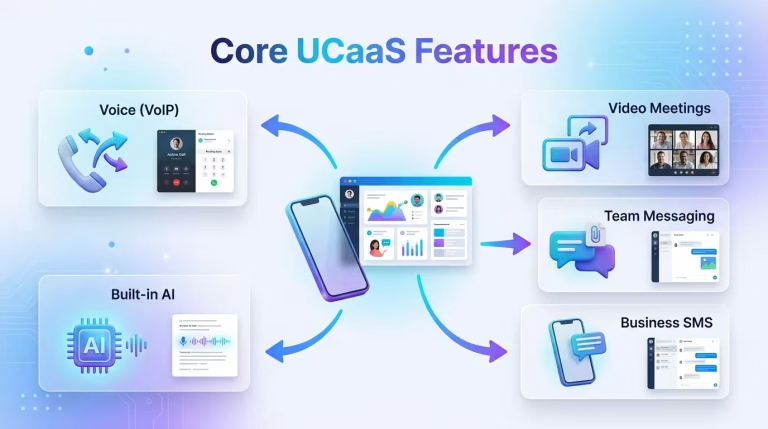
- Voice (VoIP). Business calling over the internet. An auto attendant greets callers with a menu, call routing sends calls to the right team, and call recording helps with training and disputes, with consent. See IVR and call distribution.
- Video meetings. Online meetings with screen sharing and recording.
- Team messaging. Chat channels and file sharing for quick questions, so you need fewer long email threads.
- Business SMS. Text customers from your business number. In India, commercial SMS must be registered under TRAI’s rules, known as DLT, before you send it, so allow time for that.
- Built-in AI. Tools that write call transcripts, summaries and translations. Ask which Indian languages it supports and where your call audio is stored.
|
Feature
|
What it replaces
|
Who needs it
|
|---|---|---|
|
Voice
|
Desk PBX, landlines
|
Every business
|
|
Video
|
Standalone meeting tools
|
Hybrid, multi-site teams
|
|
Messaging
|
Email chains, personal chat groups
|
Teams that need quick answers
|
|
Business SMS
|
Staff texting from personal phones
|
Appointment and delivery businesses
|
|
AI
|
Manual notes and summaries
|
Sales and support managers
|
UCaaS vs VoIP vs CCaaS vs CPaaS vs hosted PBX
VoIP is the technology that carries voice calls over the internet. UCaaS is the full platform built on top of it, adding video meetings, team messaging, SMS and collaboration tools in one subscription. Every UCaaS includes VoIP, but VoIP alone is not UCaaS.
|
|
Built for
|
Typical buyer
|
Includes video/chat?
|
Customisable?
|
Example use case
|
|---|---|---|---|---|---|
|
VoIP
|
Phone calls over the internet
|
Any business
|
No
|
Low
|
A shop replacing its landline
|
|
UCaaS
|
Everyday team communication
|
IT or operations head
|
Yes
|
Moderate
|
A hybrid team on one app
|
|
CCaaS
|
Customer service teams handling many calls
|
Head of support
|
Customer chat yes, internal video usually not
|
Moderate to high
|
A support team with call queues
|
|
CPaaS
|
Building calls or SMS into your own app
|
Developers
|
Only what you build
|
High
|
An app that sends OTPs
|
|
Hosted PBX
|
A cloud version of an office phone system
|
Small business
|
Limited
|
Low to moderate
|
Office extensions with no hardware
|
Where the lines are blurring (UCaaS + CCaaS + CPaaS + AI agents)
The categories overlap more every year. Gartner sees contact centre links and generative AI as two of the biggest drivers for UCaaS vendors. So, compare what each product does, not its label.
UCaaS architecture: single-tenant, multi-tenant, hybrid
There are three ways to run UCaaS: on a shared platform (multi-tenant), on a private one just for you (single-tenant), or a mix of the two (hybrid). Most UCaaS is shared, which is how Gartner defines it. TechTarget adds that private setups usually come as managed services, where the provider runs a separate copy of the platform for you.
|
Model
|
Control
|
Cost
|
Customisation
|
Typical fit
|
|---|---|---|---|---|
|
Single-tenant (private)
|
Highest
|
Highest
|
High
|
Regulated sectors: healthcare, government, finance
|
|
Multi-tenant (shared)
|
Lower
|
Lowest
|
Lowest
|
Cost-sensitive small and mid-size businesses
|
|
Hybrid
|
Medium to high
|
Medium
|
Flexible
|
Firms that keep sensitive systems close and use the cloud for the rest
|
Benefits of UCaaS
- Lower cost (capex to opex). Rather than spending money on PBX system and equipment, you simply pay on a monthly basis per user, thus eliminating the upfront costs of significant purchases and subsequent outlays for maintenance of equipment.
- Scalability. An admin adds or removes seats online, so a new hire or a seasonal worker doesn’t need new equipment, and you stop paying for seats you no longer use.
- Remote and hybrid support. The same number and directory follow staff to any device, so people can take and make business calls from home, the office or on the road.
- Business continuity. The provider keeps backup systems running, and calls can be forwarded to mobiles if an office loses power or connectivity.
- Faster updates. On a shared platform, the provider rolls out new features to every customer at once, so you don’t schedule upgrades or buy new software versions.
Challenges and risks of UCaaS
- Your internet matters. Once calls leave your own network, nobody can fully control their quality, so a weak office connection means poor calls however good the provider is.
- Keeping your own carrier. Some providers don’t let you keep your existing carrier, or charge extra for it.
- Fit with your tools. Check that your CRM and helpdesk work with the platform.
- Costs add up. As subscriptions move on forever, users must be alert to costly bonuses that can change the fee status.
- Security. A cloud solution can be accessed anywhere, so make sure to ask for multi-factor login and role-based access.
- Lock-in. Leaving means moving numbers, exporting recordings and retraining people, so read the exit terms before you sign.
When UCaaS is NOT the right choice
- If you are looking for simple inbound or outbound calls and basic features like IVR and call recording, the solution is cloud telephony.
- CCaaS is the best fit for large contact centers. Check out our cloud contact center guide for further information.
- Choose CPaaS if your developers need to build calling or SMS into your own product.
- Hybrid solutions are recommended if you are struggling with connectivity issues.
UCaaS pricing
The usual UCaaS pricing is based on the number of users per month, meaning that your final bill is different depending on the total number of clients, required options, and selected additional features. In case of costly subscriptions, clients also benefit from analytics and integration services as well as priority client support. For Bonvoice’s current plans and rates, visit our pricing page, or book a demo for a quote based on your team.
Hidden costs
- International calling. Bundles rarely cover every country.
- Add-ons. Recording, analytics, AI and SMS are often charged per user.
- Moving your numbers. Expect one-time fees, and double running costs if it slips.
- Hardware and network. Phones, headsets and a backup internet link.
Reliability and SLA: what “99.99%” actually means
An SLA is the uptime a provider promises. Even a very high number allows some downtime, and each extra “nine” allows less of it. Before you trust the number, read the fine print:
- What’s excluded. Maintenance, carrier faults and problems on your own network are often left out.
- What’s measured. Whether the service is up, not how good the calls sound.
- What you get. Usually service credits, not compensation.
How to choose a UCaaS provider
- SLA (Service Level Agreement), and what it excludes.
- Built-in or add-on AI.
- Integrations with your CRM and other tools.
- Security and compliance, including sign-in controls and data storage.
- Mobile app parity with the laptop version.
- Numbers and carriers, including help moving yours.
- Exit terms, including taking your data and numbers.
Questions to ask in the demo
- What happens to calls if our internet drops?
- Which features cost extra?
- Where are recordings and transcripts stored?
- How do I export everything if I leave?
- How does moving our numbers work, and how long does it take?
UCaaS for Indian businesses
Check each point with your provider and legal adviser.
- Telecom licensing. DoT’s Authorisation Rules 2026 under the Telecommunications Act, 2023 replace the earlier licensing rules, so ask your provider which authorisation it holds. DoT’s 2021 guidelines for call-centre-style businesses dropped registration and allowed remote working. Ask an adviser how the 2026 rules affect you.
- DLT for SMS. Commercial SMS needs registered sender names and message templates under TRAI’s rules.
- Moving numbers. TRAI’s portability rules cover mobile numbers only, so ask how your landline and virtual numbers can move.
- Data protection. The provision of the DPDP was made official in the month of November 2025, and will be operational in a time period of 12 to 18 months, with initiation of the principal duties from May 2027. According to the DPDP Regulations, consent, erasure of data on the grounds of revocation of consent, as well as notification of violation in 72 hours are the rules that are to be followed. Phone conversations are regarded as personal data as per the regulations.
- Connectivity. Use wired desk phones where you can and keep a backup internet link.
How to implement UCaaS
- Audit your current phones, lines and numbers, and drop what you don’t need.
- Check your network. Test bandwidth and Wi-Fi coverage.
- Pilot with a non-technical team, who’ll show you what’s confusing.
- Move numbers early. It’s often the slowest step, so keep old lines live until it’s done.
- Provide training to your employees through short training sessions that focus on their work.
- Track the quality of calls, the number of missed calls, and the acceptance during the first thirty days.
As the completion of the process heavily depends on the size of your company, the number of locations, and how fast the moving of numbers can be performed, you should think in weeks instead of days and start focusing on moving numbers.
Where AI is taking UCaaS
AI works best when it’s built into the platform, so transcripts, summaries and permissions sit in one place. Add-on AI is a separate product with its own login and data, so ask which you’re buying. AI voice agents can answer and route calls, and work best with a human backup and a narrow job to start. See our AI receptionist and AI voice agents.
Where Bonvoice fits
Bonvoice is a cloud telephony and communications platform, not a full UCaaS suite. We offer calling, IVR, routing, recording, SMS, WhatsApp, CRM integration, an AI receptionist and CPaaS. We don’t replace a video meeting or team chat tool, so if you need those, pair us with one or choose a full UC suite. We’re a vendor with a stake in this, so use the checklist above to compare us with anyone else.
Frequently asked questions
What does UCaaS stand for?
Unified Communications as a Service. It’s a cloud subscription that brings calling, video meetings, messaging and SMS together in one platform.
What’s the difference between UCaaS and CCaaS?
UCaaS is used for normal communication within the company, while CCaaS is utilized for contact centers with their queuing, agents, and data analysis functionalities. Most businesses use both services.
Is UCaaS the same as VoIP?
No, it isn’t. VoIP transmits voice calls using the Internet, while UCaaS is the overall solution that utilizes VoIP technology.
What are the benefits of using UCaaS?
UCaaS solution is affordable, easy to scale, can be utilized in connection with remote work, provides redundancy managed by the provider, and offers quick updates.
How much does UCaaS cost?
It depends on how many users you have, which features you need and which add-ons you choose. See Bonvoice’s pricing page for current plans.
How do I choose a UCaaS platform?
Compare the SLA, AI, integrations, security, mobile parity, number support and exit terms, then run a pilot.
Is UCaaS the same as hosted PBX?
No, Hosted PBX is a cloud phone service that only offers voice options, while UCaaS is an extension over the same technology that provides video and messaging too.
Can I keep my existing business number?
Often yes, through porting. In India, TRAI’s portability rules cover mobile numbers, so ask your provider about landlines.
When is UCaaS the wrong choice?
When you only need calling, run a high-volume contact centre, or have unreliable connectivity.