
 ChatGPT
 Claude
 Perplexity
 Grok
Grok
Call center software is an on-premise cloud communication technology that helps businesses to manage, route and track inbound and outbound calls and messages through multiple channels. A call center software acts as a central point with which your business can easily opt out of traditional modes of communication and connect with customers easily by setting automated workflows.
Whether your business is focused on a customer support team that handles your high impact leads, or a rising small to medium business enterprise, a call center software is what decides your workflow optimization. A call center software thus, can give the agents access to customer histories the moment a call connects.
Types of call centre software
Choosing the right call center software strictly depends on your business requirements and capabilities. The call center platforms mainly fall under three categories:
- Cloud-based SaaS/ Virtual
- On-premise (hardware owned)
- Hybrid (mixed system)
Now, let us look into detail what each category means.
Cloud-Based Call Center Software
Cloud-based call center software or CCaaS is hosted entirely over third party vendors. Agents then can easily log into the platform over the internet via their website or mobile application through Voice over Internet protocol (VoIP). This helps to make agents readily available and companies can choose to pay on a flexible, pay-per-seat subscription model, eliminating major capital expenditures. Scaling your operations can also become easily adaptable according to the number of agents.
On-Premise Call Centre Software
On-premise call centre software works on a physical entity placed in your business data centre. So all maintenance will fall on your specific IT team and engineers. But this system will take a lot of upfront capital investment from the company and long setup times, but it will give your total local data control and overview. Even though many businesses adopt cloud setup day-by-day, some enterprises that need top level security protection still choose to do it the traditional way.
Hybrid or mixed system
A hybrid setup is used to reduce the gap between on-premise hardware systems and cloud AI analytics and softphones. This will allow existing enterprises to slow down their expenditure on a completely new setup and train staff accordingly with time.
Comparison: Cloud vs. On-Premise vs. Hybrid
|
Deployment Model
|
Setup Time
|
Cost Structure
|
Scalability
|
Best For
|
|---|---|---|---|---|
|
Cloud-Based
|
Minutes to Days
|
Subscription (Pay-Per-Seat)
|
Immediate / Frictionless
|
SMBs, distributed teams, fast-scaling startups
|
|
On-Premise
|
Months
|
High Upfront CapEx + Maintenance
|
Manual / Costly
|
Large enterprises with legacy local data laws
|
|
Hybrid
|
Weeks
|
Mixed CapEx & OpEx
|
Moderate
|
Enterprises transitioning slowly to the cloud
|
Inbound, Outbound and Blended Call Centre Software
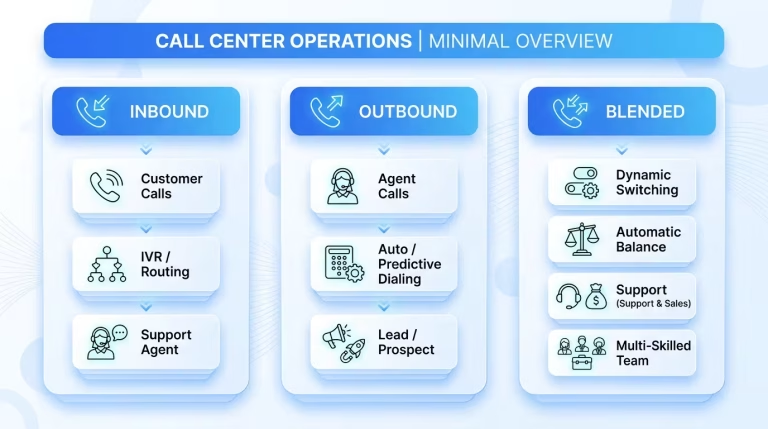
Call center platforms are basically designed around how your business interacts with callers. The software capabilities required for each company can only be decided depending on certain factors such as their particular requirement for incoming requests, outbound outreach, or both.
Inbound call center software
An inbound call occurs when a customer is trying to get an answer to their query by reaching out to the business’s customer service. Here, the customer will not remain passive. The communication will rarely become cold. Instead the call will have high intent which can determine brand loyalty in future. There are a few examples of inbound calls:
- Customer Support: these mainly handle simple queries and account updates.
- Product Inquiries: these mainly deal with questions the customer might have regarding a product, its features and pricing.
- Technical Support: customers will have queries regarding software or hardware issues they face.
- Complaint Resolution: these mainly deal with dissatisfied customers who might lodge complaints and the agent should try to retain them providing solutions.
- Order Tracking: these customer queries will be regarding their delivery updates and concerns.
How inbound calls work in call centers
The call center workflow for inbound calls is highly automated in order to reduce friction:
- Customer Calls: the journey of inbound calls start with a user dialing a toll-free or business number.
- IVR Routing: the next step is when an Interactive Voice Response (IVR) system greets the caller, and asks them to select options by pressing keys.
- ACD: as the next step the Automatic Call Distribution (ACD) technology analyzes the request and assigns the call to the most appropriate available agent.
- Resolution: Then the agent uses CRM integration to see the caller’s past history and resolves the query efficiently with the information.
The key technologies used in inbound calls
- IVR: helps to filter and segment callers.
- Call routing: this helps to ensure the right department gets connected with the caller.
- Call queues: this helps to manage wait times during peak hours.
What is an outbound call?
An outbound call is a positive action taken from the side of the company by the agent. This helps the company to outreach to possible clients and convey their offers. This gives a data backed outreach system and increase in warm leads. Some examples for outbound calls are:
- Sales Outreach & Lead Generation: outbound calling helps to pitch products to potential clients.
- Payment Reminders: this will help to notify customers of their upcoming or overdue bills.
- Customer Surveys: this helps to gather feedback via calls.
- Appointment Reminders: this will significantly reduce “no-show” rates for service-based businesses.
How does outbound calling work
Outbound calls make use of call automation to easily engage with possible clients and maximize employee productivity:
- Campaign Lists: as outbound calling primarily concerns with sales and marketing, Managers will upload a list of contacts into the call management system.
- Dialing System: the next step is that with the help of tools like Predictive Dialers multiple numbers are dialled simultaneously, connecting agents seamlessly to clients.
- CRM Integration: Agents get to see the prospect’s profile and past historical data immediately upon connection so that they can personalize the pitch.
- Call Analytics: with this data, managers can track conversion rates and agent performance in real-time.
Blended Call Centre Software
Blended software dynamically distributes both incoming and outgoing interactions across a unified agent pool. When incoming call volumes spike, the platform automatically pauses outbound dialers and routes inbound callers to available agents. During quiet periods, the platform seamlessly switches multi-skilled agents back to outbound sales campaigns.
Core Features of Call Center Software
Modern call center software includes tools to automate repetitive tasks, give supervisors full operational oversight, and connect voice communications with digital communication channels.
Interactive Voice Response
After acquiring a professional number the another step is to manage the calls that rush through every hour, even when you are busy. This is where IVR or Interactive voice response changes the game in your business strategy. So what is an IVR?
IVR is often termed as auto attendant, which is the automated menu that greets the callers with options like, Press 1 for sales, Press 2 for queries, Press 3 for billing etc…
What happens in a scenario that lacks an IVR?
For small to mid range enterprises, the major challenge they face is to handle the call volume. Often they lose customers because they couldn’t reply or take the call due to their busy phone systems which leads to customer frustration and thereby churns. Also even if the staff picks up the call they will be drained too soon of their productivity which can instead be used on their tasks effectively.
IVR handles this call volume without requiring you to hire a full-time receptionist as staff. It acts as an infinitely scalable filter.
24/7 Professional Call Routing
The most essential need of a call routing system is to handle calls effectively and the greatest benefit is that they work 24/7 regardless of the hour. This helps to give your business a feeling of standard and customer – centric.
With implementing a call routing system you can:
- Direct sales to sales : if a customer is asking a query regarding a product and its specification the system can directly route it to the sales team member.
- Support to support: if the customer has some concerns over a product or service they can be directed to the support team to solve the issue.
- After hours information : if a customer is seeking information which is after the working hours of the company or institution, the system can provide essential information like hours of operation or a link to an online FAQ before offering to take a message, solving simple queries without staff intervention.
So therefore, an effective IVR doesn’t just route calls—it screens and prioritizes them, giving your team a critical head start.
Advanced Call Routing
Through a basic call routing system we can handle all the calls without getting anything missed. But advanced call routing systems add an intelligent layer to this process by passing the call to the appropriate agent who deals with the specific section of the query. This system definitely impacts the efficiency of your business by increasing your first call resolution rate.
Intelligent call routing ensures that it uses its predefined logic to transfer the call to match the customer’s need with the agent’s capability. Imagine an IT firm, where a call related to a software issue is directed to x and a call related to network setup is directed to y. This ensures a skill based routing thereby reducing customers frustration and ensuring their ease of use. Also this feature allows the queries after your working hours to be routed to an on call manager or a voicemail box thereby ensuring every call is answered and customers expectations are met.
Call Analytics and Reporting
The difference in using a simple traditional landline system and a budget friendly call management system is in the data it provides. This helps small business enterprises to make data driven decisions and strategize accordingly.
What does call data reveal?
Your phone system provides you with continuous and real time market data that you might have been overlooking. Basic call analytics and reporting provides insights like:
- Missed calls: the data of time and duration it took.
- Peak hours: shows data of when customers are trying to reach your service often.
- Call duration: shows data of what kind of calls or what issue related calls took more time.
- Agent performance: Measures the average handle time and first call resolution period of each employee.
Analysis of this data helps you to move beyond merely reacting to calls and strategize your business efficiently.
With a basic analysis you can stop guessing and start optimizing:
- Identify peak call times to adjust staff: if you see a churn of customers via missed calls in a certain hour of the day repeatedly , you can use this data to employ more staff to this time of the hour thereby reducing the problem.
- Track which marketing campaigns generate major leads: by assigning a certain unique number to specific marketing campaigns you will be able to identify your marketing fund to the specific area of customer interest.
Adopting this call analytics feature enables you to scale your business in future according to the growth. You can easily implement and add new features such as CRM etc.. to efficiently handle the proceedings. This feature will provide you with foundational metrics to track profitability and scale operations smoothly.
CRM integration
A CRM integration is like building a smart pathway which helps to connect your CRM system with other important business tools and software. As a first step the system collects customer data from all available sources and puts it in a central space. This is called the single source of truth. Without such an integration process, there will be data silos because the customer information will be scattered in different places and the employees will find it hard to deal with the problem in front of them.
This integration uses API to make the system connect with each other and share the important data, which gets automatically updated in the other. As a result productivity is boosted, the employee gets an all around information of the customer and thereby the business gets to make better decisions.
While you can use a basic CRM platform to fulfill the needs, it only gets connected with a limited number of apps like two which is not enough for the smooth workflow. On the other hand specialized CRM integration services provide the expertise to manage complex projects and maintenance.
Call Centre Software Providers: What's Out There
|
Provider
|
Target Segment
|
Core Capabilities & Strengths
|
Deployment & Pricing Highlights
|
|---|---|---|---|
|
Bonvoice
|
Growing Businesses & Mid-Market
|
Built-in compliance (TRAI rules, DND scrubbing). Enterprise features tailored for agile remote & office teams.
|
Go live in <24 hours. Clear pay-per-seat plans, no hidden API markups.
|
|
Zendesk
|
SMB to Enterprise
|
AI-powered omnichannel ticket system and deep help desk integration across digital support channels.
|
Cloud SaaS with tier-based licensing and add-on pricing.
|
|
Talkdesk
|
Mid-Market to Enterprise
|
End-to-end CCaaS with strong Business Intelligence (BI), custom reporting, and admin controls.
|
Cloud-based per-seat plans with custom enterprise tiers.
|
|
NICE CXone
|
Global Enterprise
|
Designed for massive operations needing heavy Workforce Management (WFM), AI analytics, and massive scale.
|
Complex enterprise contract pricing and implementation requirements.
|
|
Five9
|
Mid-Market to Enterprise
|
High-volume outbound dialing campaigns, AI automation, and robust sales enablement tools.
|
Cloud subscription model combining seat and usage costs.
|
|
Exotel
|
Tech Teams & Developers
|
API-driven voice and SMS infrastructure focused on the Indian telephony market.
|
Credit/usage-based API pricing structure.
|
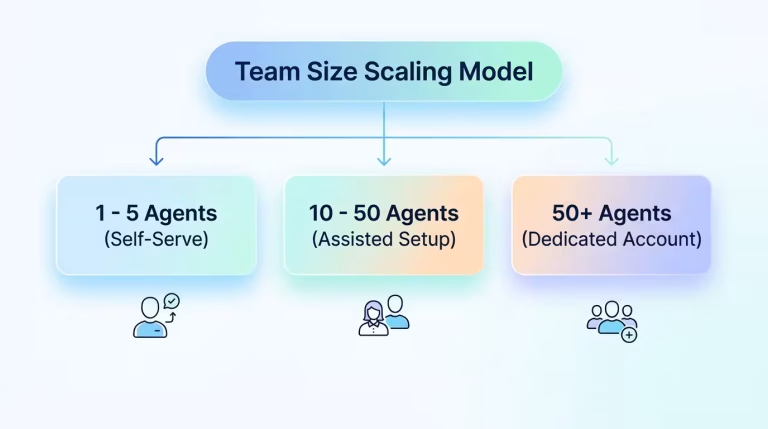
How Many Agents Do You Need It to Support?
Scalability is a factor that needs to be considered while choosing a call center software. The particular way a call center software is deployed, configured, and managed shifts based on the particular team size.
How to Choose Call Center Software
Selecting the right call center software requires evaluating your current communication gaps, technical environment, and growth plans. Use this practical evaluation checklist to guide your search:
- Budget & Total Cost of Ownership
- Deployment Speed & Ease of Use
- Omnichannel vs. Voice-Only Needs
- Essential Integration Stack
- Regulatory Compliance & Local Telco Norms
- Scalability & Support SLAs
Conclusion
The new age workplace environment calls for work life balance. Not everyone is interested in manual labor even for tasks that can be easily automated. Also every business owner who is scaling towards growth takes notes of these features and boosts their upward growth. So depending on old systems is no longer the way to success. So, cloud services are the way to go. What is best for your business will always depend on your decisions. So, you need to conduct an audit of your requirements and match it with the right service provider to enjoy maximum benefits. Because if you are a start-up you need to set the foundation strong. But if you are a large enterprise scaling further, you need advanced solutions that will be able to meet your specific requirements.
Frequently Asked Questions
1. Is call centre software the same as a call center?
No, a call center is a physical location setup dedicated to handling phone calls while a Call center software is the digital platform, phone infrastructure, and routing technology that allows those agents to handle calls and messages.
2. What’s the difference between inbound and outbound call center software?
Inbound call center software handles incoming calls from customers while outbound call center software is used by sales teams to make outgoing calls.
3. Do I need CRM integration for call center software?
While not mandatory, CRM integration is highly recommended.
4. How many agents can call center software support?
Modern cloud call center software can scale from a single user up to thousands of concurrent agents.
5. What internet speed is needed for cloud call center software?
A reliable, high-speed connection with low latency ensures clear audio quality and prevents dropped calls.
Footnotes:
“A Guide To Inbound Customer Campaign Strategies.” Forbes Business Council, 24 May 2023, Accessed 24 Aug. 2026.
Related :